
Unable to contact the Signature 365 service when using the Add-in with an on-premises mailbox
You may be using Signature 365 successfully with cloud mailboxes within Microsoft 365, but receive the following error when attempting to use it with an on-premises mailbox. This happens because Signature 365 cannot reach your on-premises Exchange server to verify you.
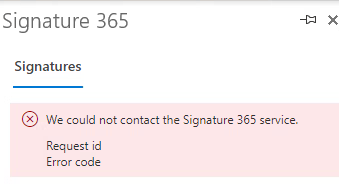
Checking the add-in logs on your device, you see the following error reported by the add-in:
[Log] [S365] [messageCompose] https://id.signature365.com/connect/token failed
This happens because Signature 365 must confirm your identity when you contact the service. For on-premises mailboxes, this can only be done by contacting your on-premises Exchange server. If your firewall blocks access to your Exchange server, Signature 365 can receive either a 401 unauthorised response or a timeout, which results in the errors listed above.
To resolve this issue, you must allow access to your on-premises Exchange servers through any external firewalls so Signature 365 can authorise your on-premises users.
The Identity servers are a global resource and use the region closest to you when you connect. If your users are geographically closer to another region, this may use the Identity server of the closer region.
The external IP addresses are listed in the following document. These will need to be granted access to your on-premises Exchange server to be able to successfully authenticate your on-premises users.
Signature 365 SMTP host list and IP whitelist : Signature 365 Help Centre